Configure Now
Items in Your Cart0
0Items in Your Cart
Start building your packageShop Now
Photogrammetry is the process of generating spatially accurate 3D models from overlapping 2D images. The technique relies on geometric reconstruction, where shared visual features across multiple frames are triangulated to estimate position in 3D space.
The output is typically a dense point cloud, mesh surface, and textured model used for measurement, documentation, and analysis across engineering, marine, and scientific applications.
Underwater photogrammetry introduces constraints including turbidity, light attenuation, and motion instability. Sensor stability, calibration, and capture consistency directly influence model fidelity.
In this article, we'll explore the fundamentals of photogrammetry—the term derived from photo (light) and metry (measurement)—and how it's transforming the way we perceive and measure the world around us.
The photogrammetry process involves capturing multiple images of an object or scene from various angles and then digitally stitching them together to form a 3D model. To achieve this, specialized cameras or remotely operated vehicles (ROVs) with high-resolution sensors are often used. This section delves into the step-by-step process of acquiring the necessary images and the subsequent software-driven transformation into a 3D model.
Photogrammetry enables the creation of highly accurate 3D models and measurements, offering a versatile and efficient solution for capturing, analyzing, and visualizing spatial data. Its applications span across many industries such as:
Revolutionizing Surveying and Mapping Surveying professionals are increasingly turning to photogrammetry for its ability to create precise and detailed maps, improving the accuracy of measurements and simplifying the surveying process.
Reshaping Architectural Design Architects and designers now rely on photogrammetry to bring their creations to life in a more detailed and accurate way, transforming architectural design processes and the benefits it offers in creating immersive 3D models.
Preserving Cultural Heritage Photogrammetry has become an indispensable tool for the preservation of cultural heritage. By turning historical artifacts and sites into 3D models, we're not only preserving our past but also enabling future generations to explore and appreciate it.
Entertaining with Precision In the entertainment industry, photogrammetry is revolutionizing special effects and game development, transforming the entertainment world and the incredible realism it brings to movies, games, and virtual environments.
Forensics Forensic investigators are using photogrammetry to piece together crime scenes in remarkable detail, making a significant impact in the world of forensics and crime scene analysis.
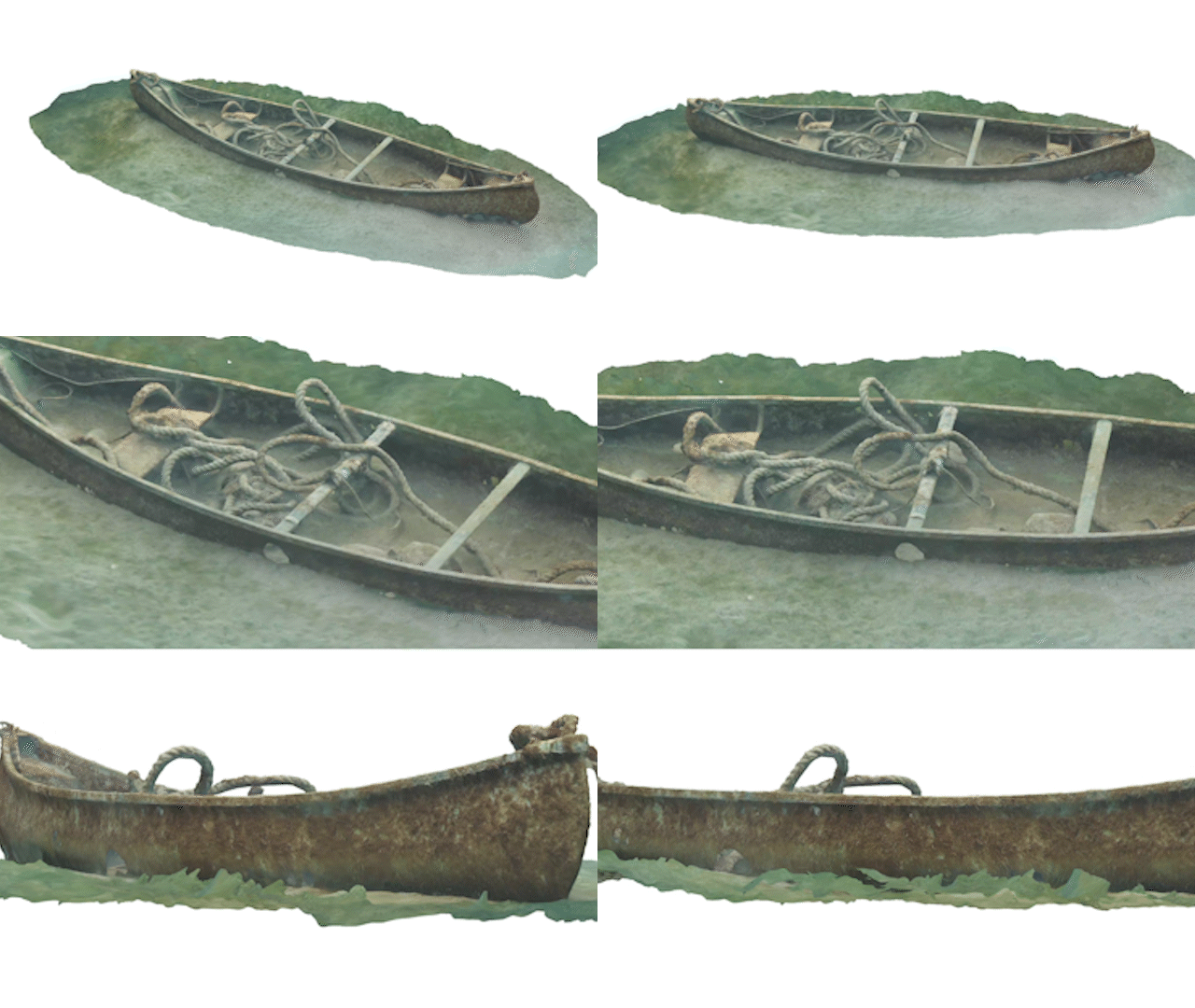
Acquiring photogrammetry footage involves a structured process that varies depending on the specific application and available tools. To illustrate this process, let's explore underwater mapping as a specific example.
Before the cameras start rolling, meticulous planning is the cornerstone of a successful photogrammetry project. It begins by defining the target area or object, determining optimal camera positions and angles, and taking into account variables such as lighting conditions, water clarity, and turbidity. Effective planning sets the stage for accurate data capture.
With a well-defined plan in place, the next step is to capture the images. In underwater mapping, this can be achieved through the use of remotely operated vehicles (ROVs) equipped with high-definition cameras or by deploying dive teams. The Deep Trekker ROV, for example, offers the convenience of the Mission Planner feature, enabling autonomous navigation along a predefined route while capturing images from multiple perspectives.
The chosen route for image capture can vary, from a spiral or wave pattern to straight paths, but the ultimate goal is to cover the largest possible area.

Achieving the best footage often requires a complete 360-degree rotation around the object. For precision, maintaining substantial overlap (50% or more) between successive photos is crucial. Close-up shots enhance texture detail, while shots from a distance aid in seamlessly stitching the object together.

To ensure high-quality images, several factors come into play. Consistency in color balance is essential for accurate modeling. It's crucial to minimize movement of the ROV during image capture to prevent blurring and to avoid disturbing debris from the seabed. Utilizing fast shutter speeds minimizes motion blur, adjusting the aperture (high f-number) provides a broad depth of field, and lowering the ISO reduces noise in the images.
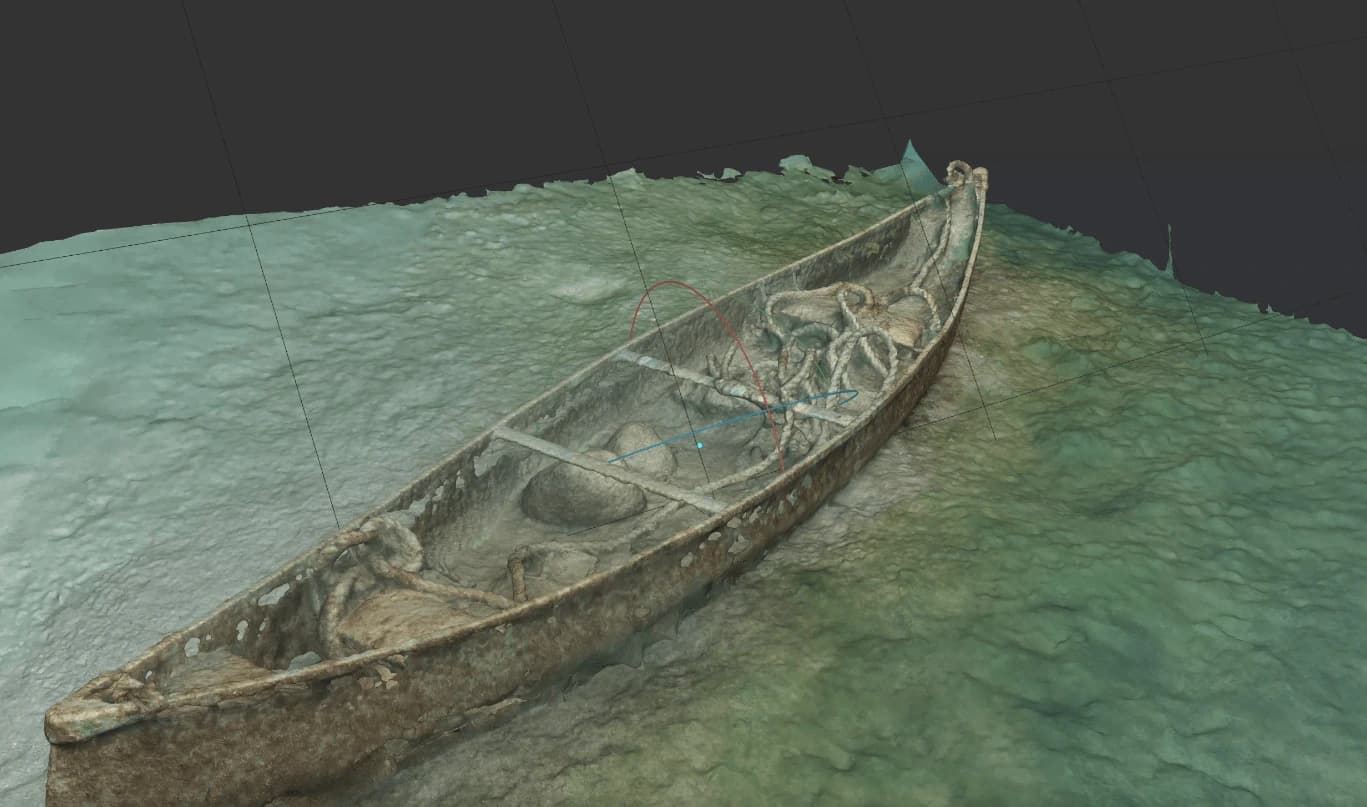
Once the images are in the can, the next step involves merging and processing them using specialized modeling software. This software employs algorithms to retain the details from each individual image, allowing it to create a point cloud—precise data about the size, area, and position of objects, like ship hull fragments. This point cloud serves as the foundation for mapping nodes or vertices onto a solid surface, ultimately forming the intricate mesh of the 3D model.
Discover how to find the best footage for your photogrammetry projects to create 3D models of underwater assets and environments.
Think of photogrammetry software as similar to putting together a 3D model. The computational task of photogrammetry is completed automatically in the background by the software, which analyzes the footage and identifies key features in each frame, including patterns or shapes. The first step, of course, is to ensure your image files are supported by the software you are using. From there, the process of turning images into a 3D model can be broken down into four primary steps:
The software's first task is to align the images in your dataset, precisely calculating their relative positions. This results in a set of images carefully coordinated to provide a clear and coherent perspective. It's during this step that the software begins to estimate depth information, assigning X, Y, and Z coordinates that will serve as the building blocks for the 3D model.
Once the images are aligned, the software creates a dense point cloud. This cloud is a virtual representation of the subject, populated with countless points, each holding both location and color information. These points collectively capture the intricate details of the subject, forming the foundation for a precise 3D model.
Building on the point cloud, the software utilizes mesh generation techniques to connect the individual points together. Imagine this as a network of triangular polygons weaving the points into a coherent structure. This process is pivotal in shaping the subject's geometry within the 3D space.
Now bring the 3D model to life. The software draws upon color and texture data from the original images. It refines the model through texture mapping, infusing it with the hues and nuances of the real subject. This final step ensures that the 3D model not only captures the physical structure but also boasts a photorealistic appearance.

Acquiring the right imagery for photogrammetry is a crucial aspect of creating accurate 3D models. The number of images needed depends on the subject's characteristics, including its size, shape, scale, and complexity. While intricate subjects demand hundreds of images captured from multiple angles, simpler objects may require only a handful.
Image resolution is a key determinant of photogrammetry quality. The resolution impacts the number of points that the photogrammetry algorithm can analyze, directly influencing the 3D model's precision and detail.
Achieving flawless 3D modeling through photogrammetry requires a meticulous approach to image requirements. Several factors come into play, including image resolution, overlap, camera settings, lighting conditions, and image acquisition angles. One critical factor is the subject's physical characteristics. Photogrammetry software excels with textured, multi-colored, and organic subjects. In contrast, smooth, shiny, single-colored, transparent, or mirrored subjects pose challenges for proper image reconstruction.
Ultimately, the goal is to capture photographs (or video) in the highest quality possible, since it will directly impact the quality that the 3D model will be rendered in. Images with high pixel count ensure clarity and sharpness in the image capture, which will result in the creation of higher quality 3D models, so you’ll want to select video and image footage that is high resolution and clear to capture the finer details and ensure accuracy.
When capturing images for photogrammetry to achieve a detailed representation, it's necessary to explore various angles and viewpoints of the object or scene. To achieve a detailed representation of an object, you’ll want to cover a wide range of perspectives. A detailed representation necessitates covering an array of perspectives, including but not limited to:

Remember, it's not just about capturing these perspectives in isolation; it's equally important to ensure substantial image overlap (50% or more) between consecutive photos. This overlap is the linchpin of the final 3D model's quality, ensuring that no detail is left uncovered and that your model emerges with the utmost precision and accuracy.
The quality of your photogrammetry model is significantly impacted by the lighting conditions during image acquisition. Adequate illumination of the subject is key to reducing the chances of distortion. Achieving the right lighting involves controlling external light sources, using diffusers or reflectors to soften and evenly distribute light, and avoiding extreme contrasts. Consistency in lighting throughout the entire shoot is paramount, making overcast days a preferred choice for outdoor shooting.
When choosing the right camera for image acquisition in photogrammetry requires careful consideration of several key components to ensure the best results. Factors to weigh include:
Most importantly, you’ll want a camera with a high resolution sensor, and manual control over settings to capture the highest quality images. It is also essential to calibrate the camera to correct any lens distortion.
Some other features to consider include stability, image format, and time-lapse and interval shooting. Many cameras now come with built in image stabilization, which will aid in capturing crisp, highly detailed images, and most digital cameras also support common file formats such as jpeg, which is supported by most photogrammetry software. Time-lapse capabilities also simplify the process and ensure consistent image capture.
To achieve accurate and detailed 3D models in photogrammetry, image overlap is a critical factor in the process. It is essential to capture a significant number of images with overlap for precise reconstruction. The overlap is useful for matching features and establishing correlations to allow the photogrammetry software to stitch the images together and create an accurate 3D model.
An overlap of anywhere from 50% up to 80% is generally recommended for best results of feature detection and matching, to improve the accuracy of the reconstruction. You’ll also want to keep in mind both side-to-side and back-to-front overlaps to help accurately align and triangulate features, and ensure optimal coverage of the subject from multiple angles. The more information you provide, the more accurate the reconstruction will be.
Varying camera orientations and multiple passes are also incredibly useful for providing additional coverage and overlap, leading to more precise reconstructions. Additionally, you’ll want to minimize occlusions or obstructions which can prevent accurate feature matching and hinder the reconstruction process. If occlusions are unavoidable, capturing additional images from different viewpoints or angles can help compensate for the missing information.
Everything covered so far—high-resolution imagery, camera calibration, minimizing movement during capture, consistent lighting, and substantial overlap across many angles—describes exactly what SPECTRA was engineered to deliver. Introduced as a new performance class of portable inspection and survey ROV, SPECTRA pairs a factory-calibrated stereo 4K camera with a seven-thruster propulsion system and real-time 3D perception, turning the photogrammetry best practices above into a repeatable field workflow rather than a series of things the pilot has to fight for.

The camera is the single biggest reason SPECTRA produces reliable photogrammetric results. It is a fully integrated, factory-calibrated rotating stereo 4K system capturing 12 MP still images and 4K video at up to 60 fps.

Image quality in photogrammetry is only as good as the platform holding the camera. Blur, drift, and stirred-up debris are the enemies of a clean dataset, and this is where SPECTRA's propulsion system does its quiet work.
Seven independently controlled brushless thrusters—four vectored and three vertical—produce 40 kg (88 lbs) of thrust in a symmetrical layout. The result is stable station-keeping in currents up to 2.3 knots from any direction, forward speeds exceeding 3.5 knots, and strong lateral control for holding a line along a structure.

Consistent, even illumination is one of the biggest levers on model quality. SPECTRA carries a high-output 300,000 lumen LED array that dynamically tracks the camera's orientation, keeping light aligned with the optical axis wherever the head is pointed. Paired with a large-format, high-sensitivity sensor, this delivers clear, consistently lit imagery suitable for photogrammetric processing—even in dark or deep water down to the vehicle's 1,000 m (3,280 ft) depth rating.

With 3D sonar equipped, SPECTRA generates a real-time point cloud through Sonar Simultaneous Localization and Mapping (SLAM), building a live 3D model of the work area as you fly—even in high turbidity. For photogrammetry, the practical benefit is coverage assurance: you can visualize asset geometry in three dimensions, confirm you've captured every face, and identify missed areas before leaving the site, rather than discovering gaps once the data is back on the surface. All SLAM processing runs onboard the vehicle, so no bulky topside computer is required.

Putting it together, a typical capture-to-model workflow looks like this:

The output supports site mapping, asset visualization, defect measurement, and year-on-year change detection—turning a single inspection into a measurable, repeatable deliverable rather than a one-time set of images.
Deep Trekker offers portable, intuitive, and affordable underwater drones, with enhanced 4K cameras, powerful LED floodlights, and unmatched stability, making them perfect for photogrammetry projects.
At Deep Trekker, we are dedicated to designing industry-leading ROVs that excel in diverse underwater tasks. Listening to customers and continuously improving our ROVs to meet their specific needs is how we learn and grow.
Our team of innovators, creators, expert engineers, technologists, and underwater enthusiasts understand the value of customer feedback and use it to drive our product development, ensuring that our ROVs are engineered to meet the many demands of real-world applications.
You get more than an industry-leading ROV when you choose Deep Trekker - you also gain access to our experienced, best-in-class senior robotics team members. Just an email or phone call away, our team is ready to provide guidance, answer questions, and offer technical support whenever you need it.
We believe in being a partner to our customers, providing more than a premium quality product, but also the expertise, ideas, and vision necessary to succeed in your underwater operations.
Our team of industry professionals is always available to offer expert guidance and address any questions you may have regarding the integration of submersible robots into your next project.
When you are ready to acquire your own Deep Trekker vehicle, reach out to us for a customized quote tailored to your requirements.
July 3rd, 2026
Everything you need to become an ROV pilot: what the job...
September 1st, 2026
Compare imaging, side scan, echosounder, and 3D sonar systems for underwater...
December 23rd, 2021
ROVs and sonar can be used to inspect underwater structures such...

March 17th, 2026
Two-day AIMS training program teaches SAR teams how to integrate sonar...
March 11th, 2026
Deep Trekker’s SPECTRA ROV integrates 3D Sonar SLAM, 4K stereo vision,...

November 3rd, 2025
At REPMUS 2025, Deep Trekker’s ROVs validated real-world mine countermeasure capabilities...